roundup
Best One-Thumb Browser Games on BopBits in 2026
A practical guide to BopBits games that work well with one-thumb touch controls, from parking puzzles and pin rescues to racing and physics.
A one-thumb game is useful when the interaction stays understandable on a phone without turning the screen into a tiny controller. The games below are from the BopBits catalog and are designed around a small number of touch actions: drag, tap, draw, or aim. They are not ranked by popularity or paid placement; this list groups the strongest choices by the kind of decision you want to make.
Every game opens in the browser, and the core play action is available without a download. If none of these mechanics fits the moment, you can browse all BopBits games instead.
Parking Escape — best for deliberate drag puzzles
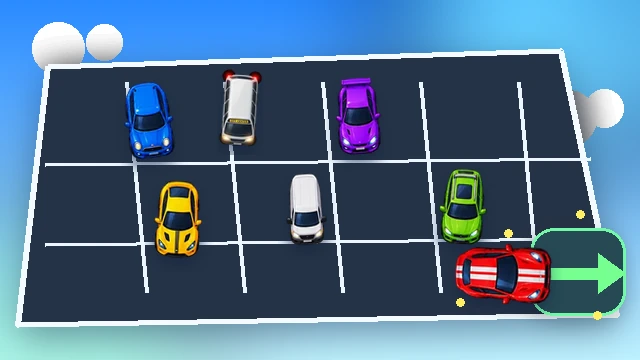
Parking Escape is a strong fit when you want a puzzle that can be played at your own pace. Cars move along their own axis and can leave only when the lane to the edge is clear. That keeps the gesture simple—drag the car in the direction it is allowed to travel—while the challenge comes from planning which vehicle must move first.
It works well for short phone sessions because there is no timing pressure between moves. You can stop, inspect the lot, and continue when the next route is clear.
Pin Rescue — best for tap-and-predict puzzles
Pin Rescue reduces input to a tap or click on a pin. The real work happens before the tap: predict what gravity will move, decide which hazard must be handled first, and release the hero only when the route is safe.
Choose it when you want a puzzle with immediate cause and effect. A wrong order resolves quickly, so retries teach you something without requiring a long setup.
Highway Rush — best for continuous one-thumb steering
Highway Rush is the most reflex-driven game in this group. Drag horizontally to steer through traffic while the car accelerates automatically. Vehicles telegraph lane changes before moving, and deliberate near misses build the score multiplier.
The gesture is continuous rather than turn-based, but it still maps naturally to a single thumb. Small corrections are more useful than wide swipes, especially when traffic becomes dense. Pick this when you want a two-to-seven-minute score run instead of a quiet puzzle.
Traffic Tangle — best for planning several moves ahead
Traffic Tangle is another vehicle game, but it replaces racing reflexes with sliding-car logic. A drag can move a vehicle through multiple clear cells, and each committed move changes which escape lanes remain available.
It is a good one-thumb choice when you like spatial reasoning. The input stays direct while the board gives you enough information to think ahead before committing.
Draw Rescue — best for one-gesture physics experiments
Draw Rescue asks you to create a protective line and then let the physics simulation answer whether the shelter works. The drawing gesture is simple, but line placement, length, and shape determine how falling hazards will bounce or slide.
This is a useful option when you prefer experimentation to a fixed sequence. A failed drawing is not just a loss; it shows how the physics reacted, which gives you a concrete adjustment for the next attempt.
Ragdoll Arena — best for compact physics action
Ragdoll Arena turns a drag into launch direction and power. Momentum, collisions, damage, and the platform edge decide the round, so the interaction feels more physical than a conventional button-heavy brawler.
Choose it when you want action but do not want a virtual joystick plus several attack buttons. The single launch gesture still leaves room for timing and angle decisions.
How to choose quickly
If you have one quiet minute and want to think, start with Parking Escape or Pin Rescue. If you want a score chase, Highway Rush gives you immediate motion. Traffic Tangle is better when you want to plan several moves. Draw Rescue and Ragdoll Arena are the picks when the fun is seeing how a physics system responds to one well-chosen gesture.
The common rule is that the screen should spend its space on the game state rather than on controls. That is why these games remain readable on touch devices even though their mechanics are different. For more puzzle, racing, physics, merge, and idle choices, open the full BopBits game collection.